Built in Switzerland
A serious macro tracker. Free to use.
Everything you need to track, in the right place, and nothing that nags you. No ads, no account.

 Scan to install
“Exactly what I was looking for. Tracking without any unnecessary frills. Lightning-fast barcode recognition.”
No ads. No streaks. No account.
“Everything is optimized to track, not to engage.”
Smart tools that work together.
The clever parts run in the background and feed into each other, so the screen only shows what you need.
- Weigh-ins and your diaryMeasured expenditure, and targets that follow it
- Each food's data sourceA verified, partial or estimated flag on every value
- Your micronutrientsThe foods they came from, and daily fiber, sugar and sodium checks
- Notes on a meal photoAn estimate built around them, as rows you can edit
- An import from another appTrends and an expenditure estimate from day one
- Everything you logAnswers from Ask Pensum about your own data
“The app connects so many smart and scientific tools in the background without feeling overloaded. Everything is simply in the right place.”
Where the numbers come from.
The generic foods ship inside the app, from three national food composition databases, and search works offline. Each result shows its database and how many of the 18 tracked vitamins and minerals it has.
Branded products come from Open Food Facts. If one is missing, photograph its nutrition label and confirm the values Pensum reads.
-
USDA FoodData Central8,028US generic foods
-
Bundeslebensmittelschlüssel (BLS)7,140German generic foods
-
Swiss Food Composition Database1,190Swiss generic foods
-
Open Food FactsMillionsBranded products, searched live

Adaptive targets. Free.
Pensum measures your energy expenditure from your own weigh-ins and intake, then adjusts your target as your body changes. Pin protein, fat or carbs to a number, and the rest keeps adjusting.
On one MacroFactor user's year of data, Pensum's expenditure was 15 kcal a day off MacroFactor's on average. MacroFactor charges at least $71.99 a year for that number.

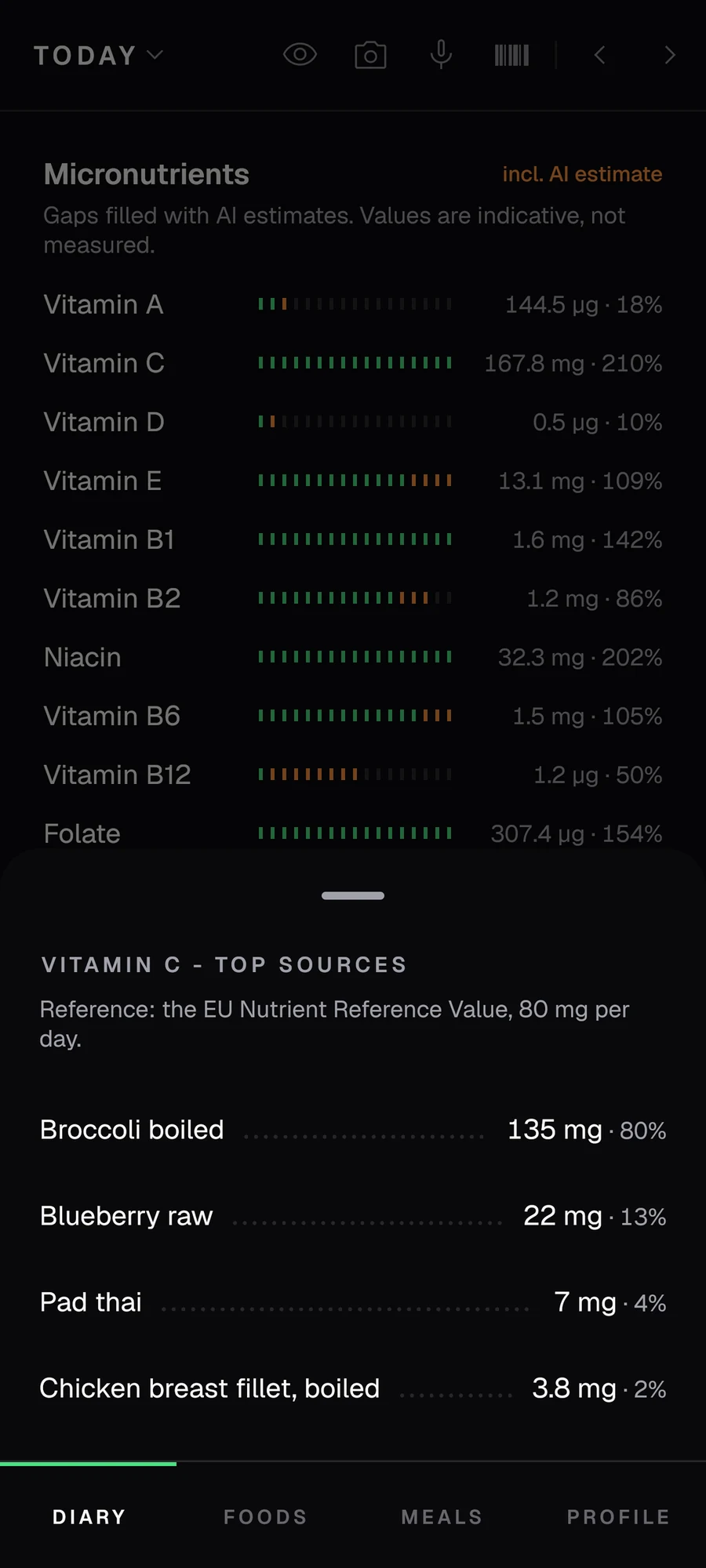
See which foods your vitamins come from.
Vitamins and minerals get the same gauges as your macros, against your daily targets. Tap one to see the foods it came from, each value flagged as verified, partial or estimated.
Foods without micronutrient data can be filled in with an AI estimate in one tap. With Plus, that happens on its own as you log.
“The Insights tab and all the trends over your own data are insanely good, and you can get a sense of both your macros and micros.”
I stripped the micronutrients off 250 lab-tested foods and measured how well AI puts them back. Read the results.
For meals you can't weigh.
Add up to five photos of one meal and tell Pensum what you already know: rough weights, the oil, the bowl size. You get an editable list of ingredients, flagged as an AI estimate so it never passes for a weighed value.
I test the photo engine on real plates with scale-verified weights and publish every number. Read the research, or see how photo logging works.
Thought through, down to the details.
Ask your own diary.
Ask Pensum reads your meals, macros, weight and targets, and answers from them. Nothing changes until you tap Apply. More about Ask
Answers are AI-generated and can be wrong.

Today, on your home screen.
Calories, macros, fiber and sodium against today's targets, with buttons for search, barcode, dictation and photos.
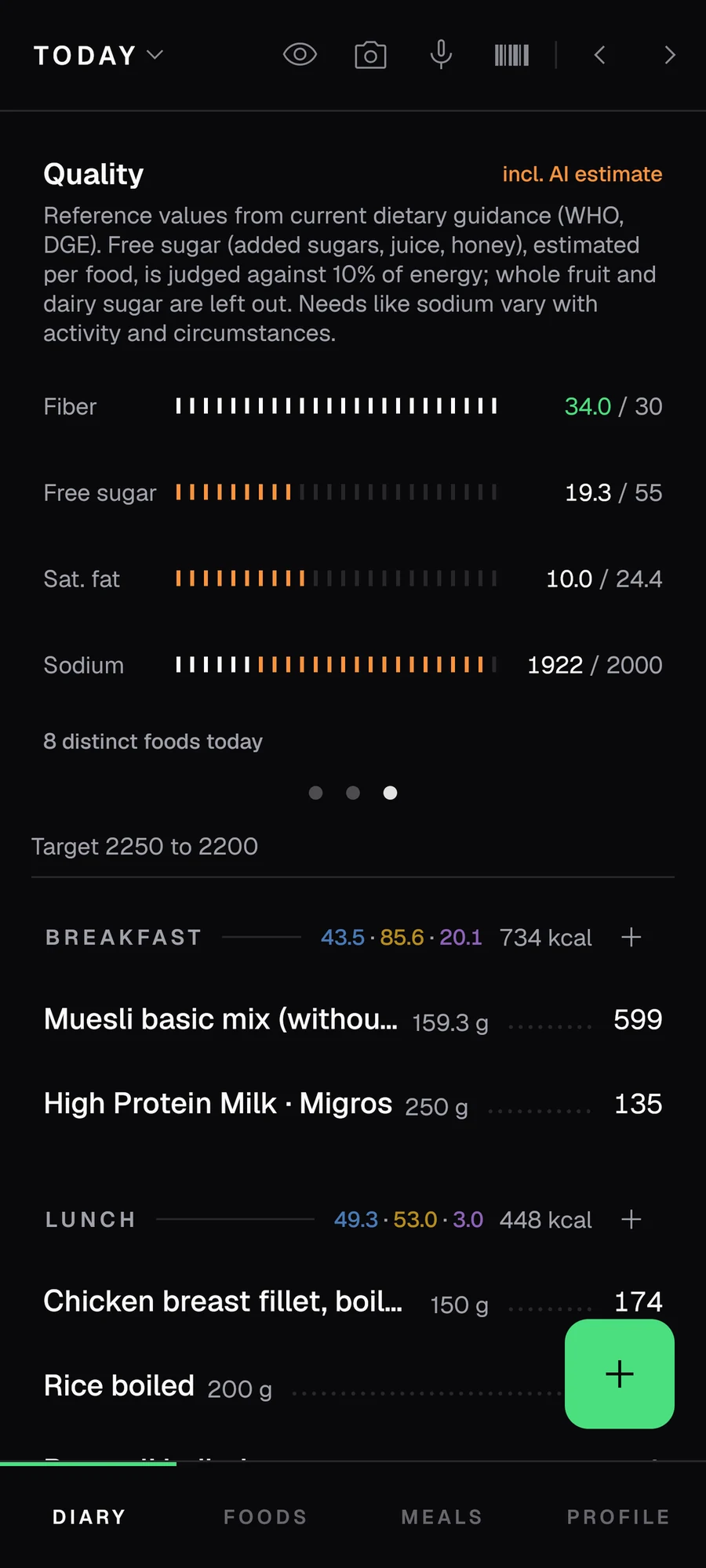
Diet quality, checked daily.
Fiber, free sugar, saturated fat and sodium against WHO and DGE reference values.
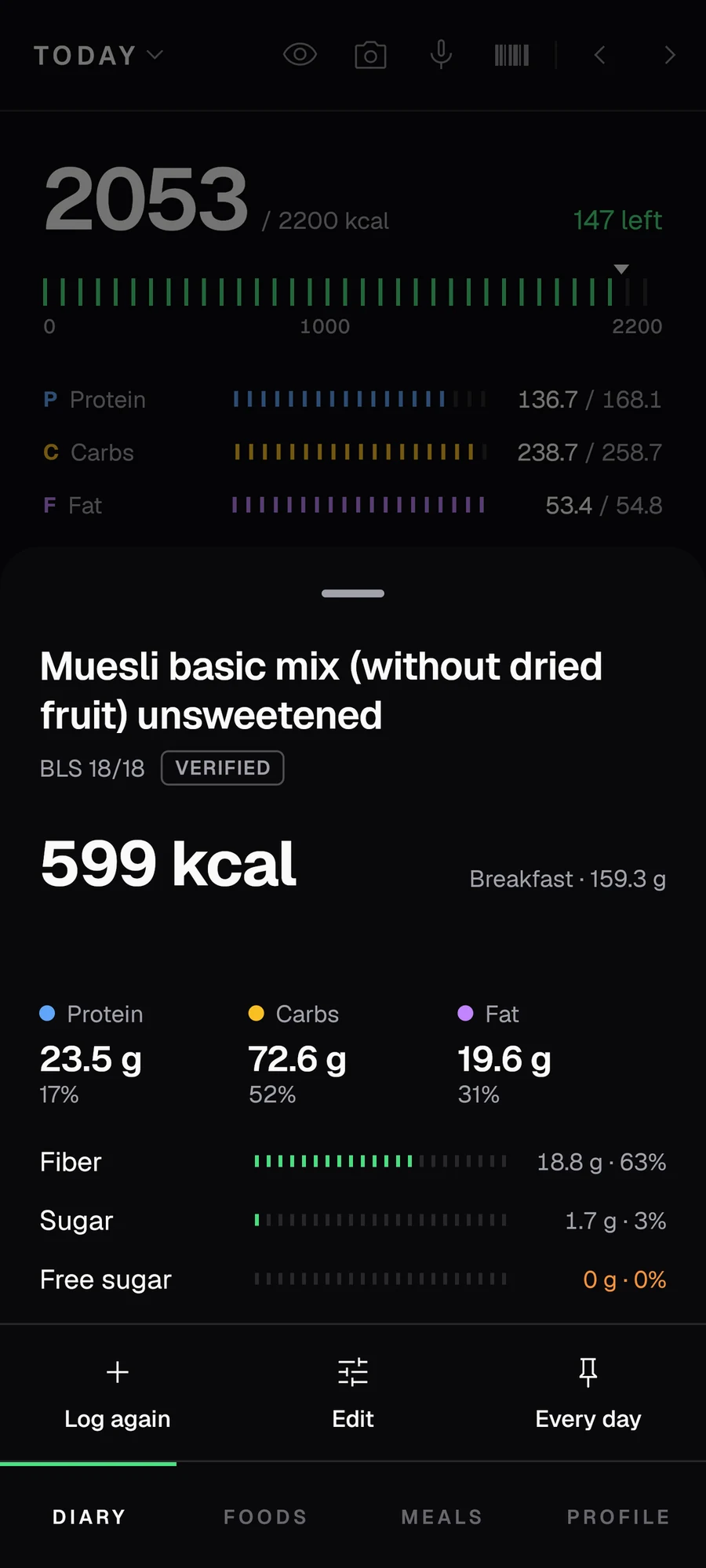
Down to the gram.
Each food shows its source and how many micronutrients it reports. You can change the amount after you log it.
Bring your history.
Pensum imports your diary and weigh-ins from eight apps, so your trends and expenditure estimate start with the data you already have.
- MyFitnessPal
- Cronometer
- MacroFactor
- Lifesum
- OpenNutriTracker
- FatSecret
- YAZIO
- FDDB
Export from your old app, pick the file in Pensum and check the preview before anything is saved. How to get each export.
“I was looking for a better macro-tracking app, as I had been using Cronometer, and I definitely found it here. ... I've switched over completely.”

Side by side with the app you use now.
What people write on Google Play.
4.8 on Google Play
“An incredibly fast, clean app that leaves me completely satisfied with its free features. The search function has also recently become incredibly precise. I've tried everything, and this is the best.”
“This app is very slick. I really love how snappy the interface is. ... It is actually quite easy to navigate and doesn't require many clicks to achieve entries.”
“Finally! It simply does what it's supposed to. ... it's so, so much more pleasant to use than the competition.”
“My absolute favorite app for tracking calories. Ad-free, functional, and constantly receives valuable updates (the developer takes user feedback seriously).”
No ads team and no investors: feedback goes straight into the next release.
Everything is free. Plus pays for what costs money to run.
Free
The whole tracker, with no ads and no account.
- Full food diary and logging to the gram
- Barcode scanning, a hand-curated catalogue and millions of products via Open Food Facts
- Saved meals and recipes
- Micronutrients, flagged for confidence
- Adaptive targets from your measured expenditure
- Trends, weigh-ins and Health Connect sync
- Imports, manual backups and export
- AI meal photos, label scans, recipe imports and Ask Pensum
Pensum Plus
Everything in Free, plus:
- Unlimited AI actions. Meal photos, label scans, recipe imports and Ask Pensum.
- Micronutrients fill in on their own as you log.
- Automatic cloud backup. A copy of your diary every day, encrypted in transit and at rest, on servers in the EU.
- An independent app. No ads, no data sale, no investors.
50% off your first year (launch offer)
Get PlusSubscribe in the app under Settings. Cancel anytime in Google Play.
“Right now, knocking on wood, the best app bar none to track both macros and micros, even in the free version. Actually both incredibly powerful and simple.”
Google Play shows the price in your currency.
iOS is next.
Leave your email and I'll send one message when the iPhone version ships. Nothing else, ever.
Good to know.
Is Pensum really free? What's the catch?
There's no catch. Everything is free: the diary, manual tracking, barcode scanning, recipes, micronutrients, trends, adaptive targets, AI meal photos, label scans, Ask Pensum, manual backups, export and imports. There are no ads, and no account is required. Pensum Plus adds conveniences on top: unlimited AI actions, micronutrients that fill in on their own as you log, and a daily cloud backup.
Which food databases does Pensum use?
Pensum is built on verified generic-food data: USDA FoodData Central, the German Bundeslebensmittelschlüssel (BLS) and the Swiss Food Composition Database, plus Open Food Facts for barcodes.
Is Pensum a good Cronometer or MacroFactor alternative?
If your friction with Cronometer is buried generic foods, slow logging, or ads, Pensum fixes exactly that: generic foods ranked first, quick entry, no ads. Its targets follow your measured expenditure, and you can pin any macro in grams. It is a leaner alternative on real national food data, with European coverage most apps lack. Pensum imports your history from Cronometer, MacroFactor, MyFitnessPal, Lifesum, OpenNutriTracker, FatSecret, YAZIO and FDDB.
Does Pensum work for German, Swiss and Austrian foods?
Yes. Searching Brötchen or Quark returns the actual food at the top, with the forty packaged products ranked below it, because Pensum puts clean generic foods above branded noise.
Can Pensum estimate a meal from a photo?
Yes, and you lead. Add up to five photos of the same meal and tell Pensum what you already know (rough weights, the oil, the vessel size). Pensum takes those as given and returns an editable ingredient breakdown that you correct.
Is Pensum on Google Play?
Yes, Pensum is live on Google Play. That is the recommended way to install it.
No Google services on your phone?
Download the direct Android APK. Android will ask permission to install from the browser, and the APK does not auto-update: re-download it here to get new versions. On an older 32-bit phone, take the 32-bit APK instead. Pensum Plus is a Google Play subscription and does not carry over to the sideloaded build; cancel it in Play before you switch.
Do I need an account?
No. Pensum is local-first; your diary stays on your device.

The whole tracker, free, with no ads.
4.8on Google Play